How Image Mode Helps Locate Temperature Anomalies During Inspections


Thermal imaging cameras are widely used for electrical inspections, industrial maintenance, building diagnostics, and equipment troubleshooting. By detecting infrared radiation and converting temperature differences into thermal images, these devices help users identify areas that are abnormally hot or cold. However, seeing a temperature anomaly is only part of the inspection process. Technicians also need to understand exactly where the abnormal area is located and which component may be affected.
This is where imaging modes become particularly important. Different thermal imaging modes present infrared and visible-light information in different ways. Choosing the right mode can make temperature anomalies easier to identify, understand, and record.
Why Image Modes Matter in Thermal Inspections
Thermal images use different colors to represent temperature variations across a target. Areas with different temperatures appear in contrasting colors, making it easier to identify potential thermal anomalies.
However, pure infrared images sometimes fail to clearly reveal the physical details of a target object. For example, when inspecting electrical cabinets, thermal imaging can show hotspots, but it may be difficult to identify the exact switch, cable connection, or terminal responsible.
Image modes effectively solve this problem by combining or switching between infrared and visible light images. Technicians can examine temperature information while maintaining a better understanding of the actual inspection scene.
Understanding the Main Thermal Imaging Modes
Different image modes cater to different inspection requirements. Common modes include:
IR Mode
Infrared mode displays only the infrared thermal image. It focuses on representing temperature distribution, helping users identify hotspots, cold areas, and temperature differences within a target area. This mode is ideal when technicians need to concentrate on thermal details without visible-light information.
VIS Mode
Visible-light mode displays the image captured by the camera in the visible spectrum. It presents the actual appearance of the object under inspection, including its shape, structure, and surrounding components. This helps technicians recognize equipment and understand the physical inspection scene.
MIF Mode
MIF mode combines infrared and visible-light images into a single fused image, allowing users to view temperature distribution alongside the physical details of the target. This helps technicians better correlate thermal anomalies with the corresponding components and structures during inspections.
MIX Mode
Thermal images of high-temperature areas are overlaid on the visible image to highlight thermal anomalies while retaining scene details, with automatic alignment of infrared and visible images.
PIP Mode
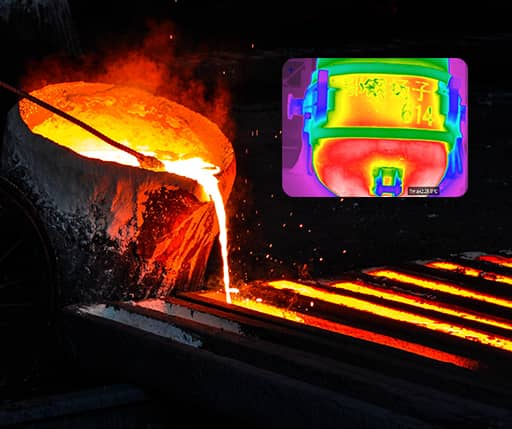
PIP stands for Picture-in-Picture mode. It displays a thermal image inside a visible-light image, providing temperature data for a specific target area while maintaining a view of the surrounding environment. This is useful when technicians need to examine a specific hot spot without losing the overall scene.
Each mode offers a different way of presenting inspection data. Switching between them allows technicians to select the image presentation that best matches the inspection task.
How Image Modes Help Identify Temperature Anomalies
Selecting the appropriate image mode enables more effective localization of temperature anomalies.
For example, during electrical inspections, IR mode can quickly detect overheated connection points. The technician can then switch to VIS mode to identify the physical component or use a fusion mode to view the thermal anomaly together with its surroundings.
In industrial equipment inspections, image modes help users compare the temperature distribution across motors, bearings, pumps, and other components. When suspicious high-temperature areas are detected, visible-light details assist in pinpointing their exact locations.
In building inspections, thermal images can reveal abnormal temperature patterns around windows, walls, ceilings, and insulated structures. Combining thermal information with visible-light information makes the description of affected areas in inspection reports more intuitive and clear.
Image modes do not automatically determine the cause of an abnormal temperature. Their purpose is to help users observe and locate issues more clearly; identifying the specific cause requires further measurement and professional assessment.
Explore the Five Image Modes of the Guide FAST Series
The new FAST series of advanced thermal cameras from Guide features five image modes: MIX, IR, VIS, MIF, and PIP. These modes offer users greater flexibility when inspecting various types of equipment and environments.
For instance, when conducting electrical inspections, a technician might need to locate an overheating terminal within a crowded electrical cabinet. While traditional thermal imaging can highlight heated areas, identifying the specific physical component often requires extra time. MIX mode makes it easier to highlight the high temperature thermal information on the visible equipment scene.
This mode is equally valuable when inspecting industrial machinery, building structures, or other complex targets. Technicians can intuitively grasp the spatial relationship between temperature anomalies and surrounding components, rendering on-site identification more intuitive and efficient.
The FAST Series also features AI-powered image fusion alignment. Infrared and visible light images can be automatically aligned in about 0.4 seconds without manual adjustment, thus effectively shortening the time required for image calibration during inspection.
Conclusion
In thermal imaging inspections, image modes play a vital role by enabling users to simultaneously grasp temperature data and the physical location of anomalies. IR, VIS, MIF, and PIP each provide different ways to view an inspection target.
The Guide FAST series features five distinct image modes, providing flexible options for electrical inspections, industrial maintenance, and building diagnostics. Notably, the new MIX mode is exceptionally practical; it integrates visible-light scenes with thermal imaging data, allowing technicians to more easily pinpoint areas with temperature anomalies and identify their precise locations. Combined with AI-powered image alignment, these features support a more efficient and intuitive inspection workflow.